Help Center / Reaction Roles / How to build a self-assign role panel
How to build a self-assign role panel
A panel is a message with buttons. You choose the roles, the look, the words and how picks behave.
Build it
- Add the rolesPick which roles members can self-assign.
- Style each buttonSet a label, colour and optional emoji per role.
- Pick the modeToggle adds and removes on click; unique makes picks exclusive so choosing one removes the others; add-only and remove-only cover special cases.
- PublishPick a channel and post. Edits in the portal update the live panel within seconds.
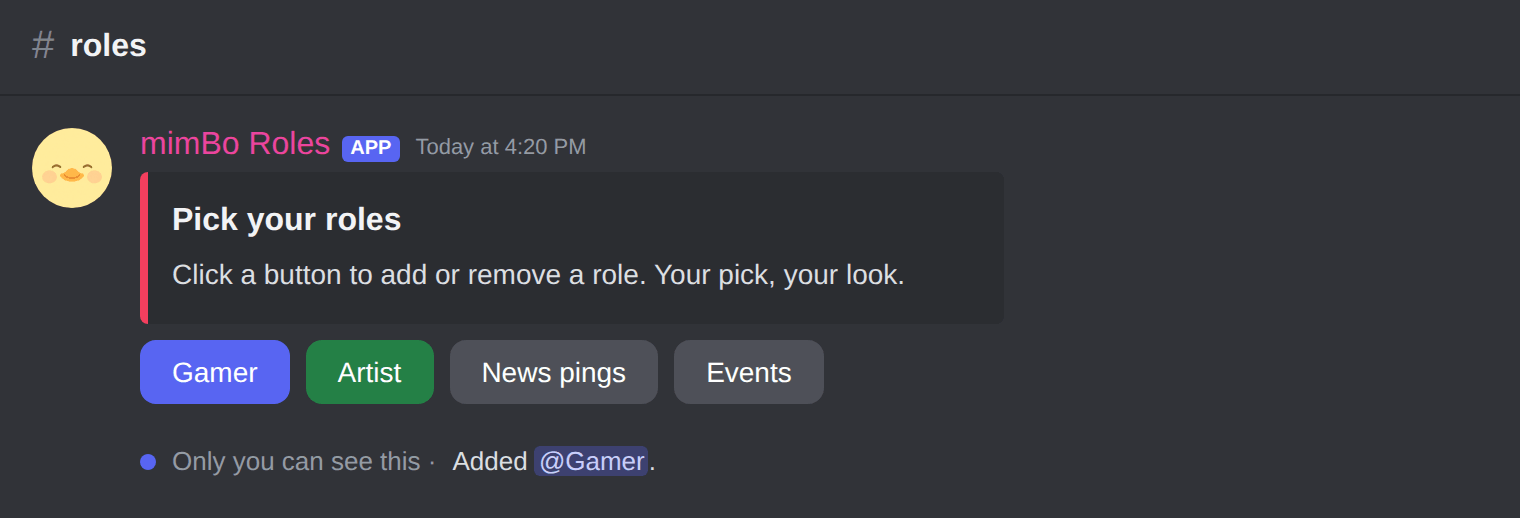
A published panel. Clicks answer privately: Added @Gamer.
Previous: How to set up reaction roles on Discord Next: Buttons or reactions: which self-assign roles to use
Can't find what you're looking for?
Ask us anything in our Discord and we'll help you out.
Ask in our Discord