Help Center / Moderation / How to monitor everything your moderation bot catches
How to monitor everything your moderation bot catches
Instead of scrolling a log channel, check one page that collects everything Moderation, Anti-Raid and the AI Chat Filter caught.
Open the dashboard
- From the module dashboardPress Safety dashboard at the top right of your server's module dashboard.
- Review the feedIncidents stream in newest first, tagged by module and severity, so you can see what happened overnight at a glance.
- Filter by moduleSwitch between All, Moderation, Anti-Raid and Chat Filter to isolate one bot's activity.
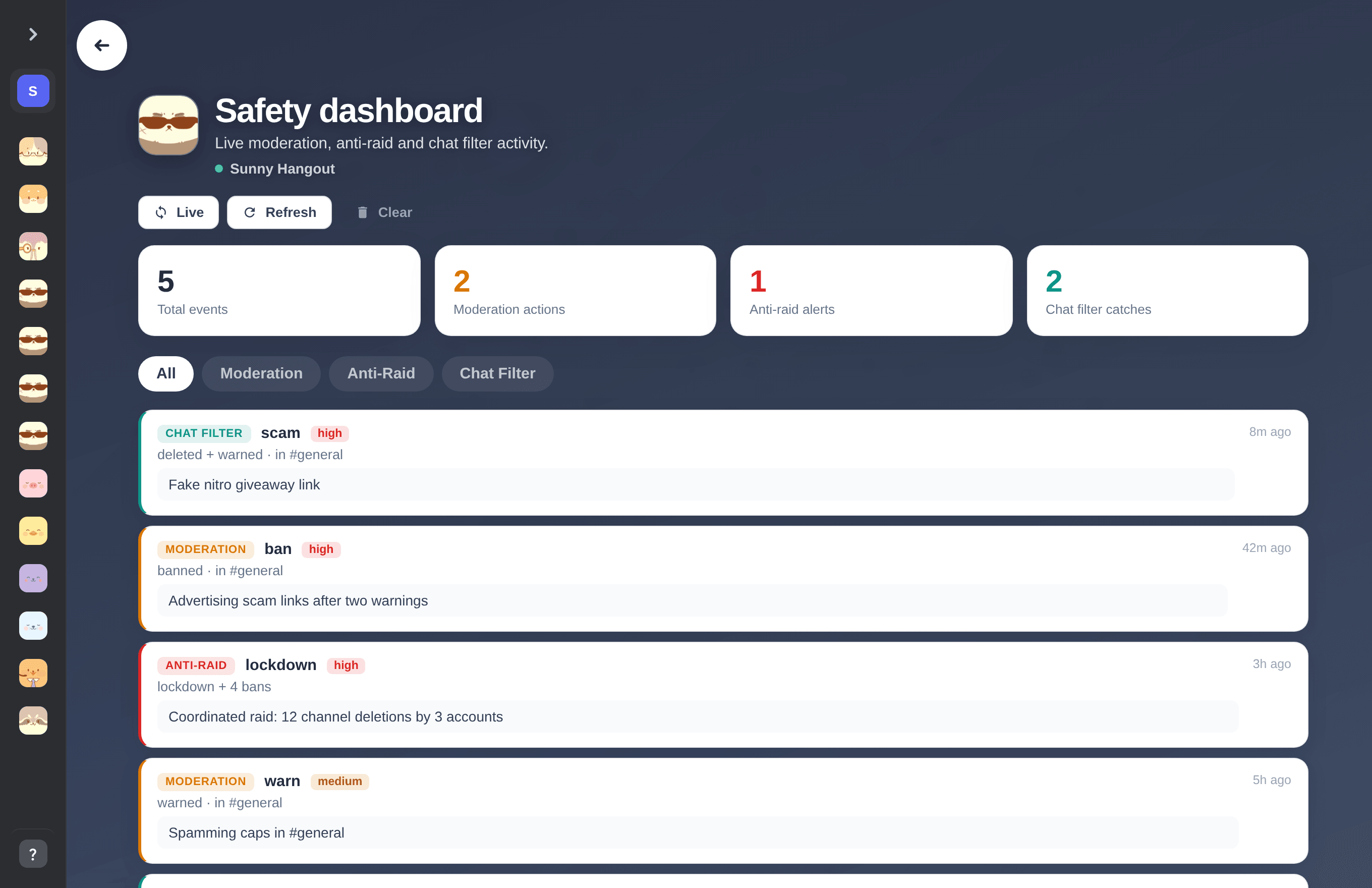
The safety dashboard. Counters at the top, a live filterable feed below.
Check from inside Discord
| Command | What it does |
|---|---|
| /raidstatus | Show the current raid status, alerts and recent automatic actions. |
| /serverinfo | Quick server overview. |
| /report user reason | Let members report someone; reports land in the log and dashboard. |
Tip. The dashboard link also lives in the header of the Moderation, Anti-Raid and Chat Filter settings pages.
Previous: How to exempt staff from auto-moderation and catch hacked mod accounts Next: Every Discord moderation command and what it logs
Can't find what you're looking for?
Ask us anything in our Discord and we'll help you out.
Ask in our Discord